Edgeora Edge Lighting brings RGB notification borders to Android
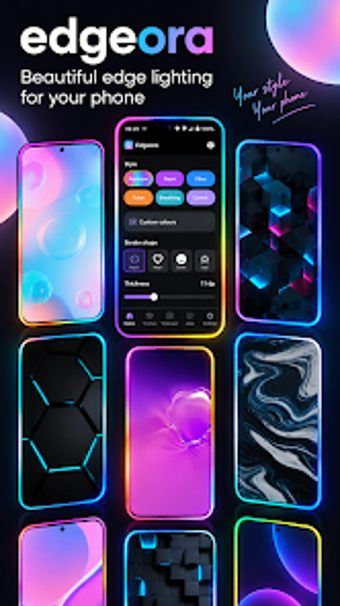
Edgeora - Edge Lighting, developed by notStudio, converts standard Android alerts into edge-based visual signals for device awareness. The app displays colorful glowing borders for notifications, calls, and charging events, replacing or augmenting sounds and vibrations. It offers granular controls for color, animation speed, border thickness, and notch shape, plus an Always On Display integration. The target audience includes Android users who want device personalization or high-visibility alerts for silent or hearing-impaired use.
What the app is and how it alerts users
Edgeora functions as a visual notification layer that triggers when the system reports a notification or charging state. The app converts incoming alerts into RGB edge lighting that wraps the screen perimeter, and it can identify which app caused the trigger without reading message content, reflecting the developer's privacy-centric design. This model suits scenarios where sound or vibration is suppressed but a clear visual cue remains necessary.
How it shapes everyday notification workflows
The tool lets users assign lighting behavior per application, so a messaging app can produce a different color or animation than an email client. Customization covers animation speed, glow intensity, border thickness, and themed border styles such as dots or hearts. Integration with Always On Display permits persistent visual alerts while the device is locked, which changes the visual confirmation process for incoming items and charging events.
Permissions, device fit, and battery considerations
Edgeora requires Notification Access to detect triggers and Overlay Permission to draw over other apps, which matches its overlay-based approach. The settings include notch and corner adjustments for Infinity U, V, and O displays, helping the lighting align with varied hardware. The app is described as lightweight, and it offers animation duration and repeat limits that users can reduce to lower the power impact of always-active visuals.
Who should use Edgeora and what to expect
Edgeora is a practical choice for Android users who need visible, non-audible alerts, particularly people who keep devices silent or have hearing impairments. Expect precise control over how alerts appear and the need to grant notification and overlay permissions. The trade-off is ongoing display activity that requires attention to animation and repeat settings for battery management; for visually driven notification workflows, it suits daily use.